How to Play LinkedIn Mini Sudoku
Mini Sudoku is a six-by-six version of Sudoku on LinkedIn. A few digits are already filled in and heavier lines divide the board into six regions. Your job is to fill the blanks so each row, column and region contains 1 through 6. The digits are labels. What matters is which ones can still fit in a square.
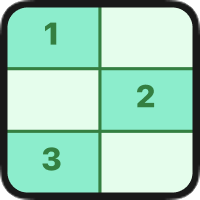
Mini Sudoku rules
- Fill the empty squares with digits 1 through 6. Leave the given digits in place.
- Each digit appears once in every row and once in every column.
- Each outlined region must also contain one of each digit. Check the borders before treating nearby cells as part of the same region.
Solve a row with two blanks
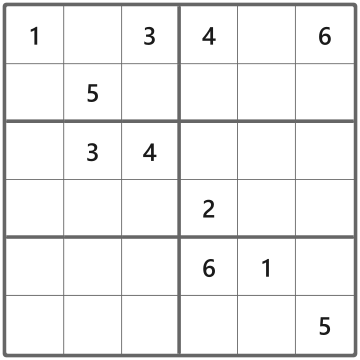
Step 1. The top row needs a 2 and a 5. Look down the second column before deciding which number goes in the first blank. 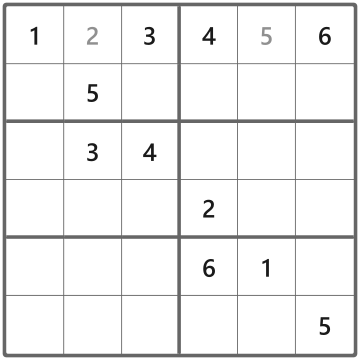
Step 2. Column 2 already has a 5, so its top square must be 2. The remaining top-row blank takes 5. 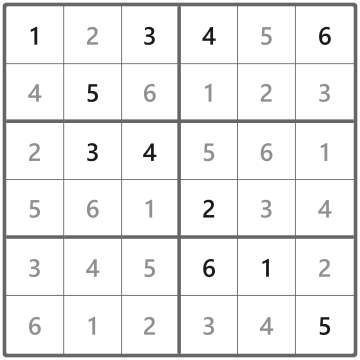
Step 3. Each placement removes an option in three places. Check the affected row, column and region for your next move.
How to play on LinkedIn
- Start with a row, column or region that’s nearly full. List its missing digits, then check each blank against its other two groups.
- Select a blank square and choose a digit on the keypad.
- Use Notes when more than one digit can fit. Keep candidates there as you solve, then turn Notes off to enter a final digit.
- Use Hint for help with a square, Undo to reverse a move, or Clear to restart. Highlight sections in Settings can help you see which groups the selected square belongs to.
Mini Sudoku solving tips
Look for a digit with only one home
A square may have two or three candidates, yet still be the only place its region can take a 4. Put the 4 there and cross it off the nearby notes.
Use the edge of a region
If every possible place for a 6 within a region lies in one row, that region must use the row’s 6. Remove 6 from candidates in the rest of that row outside the region.
Clear notes as you go
After placing a 3, remove 3 from the notes in its row, column and region. A square with two candidates can become a sure thing after one cleanup.
Common questions
Does Mini Sudoku use 1 to 6 or 1 to 9?
LinkedIn’s Mini Sudoku uses 1 to 6 on a six-by-six board. The outlined regions also hold six cells each.
Do the diagonals need all six digits?
The game checks rows, columns and outlined regions. A digit can repeat on a diagonal as long as those three rules are satisfied.
What are Notes for?
Notes let you record several possible digits in a cell while you work out which one fits. Switch back to normal entry when you’re ready to commit to a number.
What if a blank has more than one possible digit?
Leave the options in Notes and look elsewhere for a forced placement. You can also check whether one of those digits has no other spot in the same row, column or region.
When does Mini Sudoku reset?
LinkedIn releases a new puzzle every day at midnight Pacific Time. Find previous solutions in the Mini Sudoku answer archive.