How to Play LinkedIn Zip
Zip is a daily logic puzzle on LinkedIn. You start with a grid of empty squares, a few numbered checkpoints and, on some boards, walls between squares. The challenge is to draw one continuous path from 1 to the highest number, visiting the checkpoints in order and using every square exactly once. A route can reach all the numbers and still leave empty squares behind, so each turn has to leave room for the rest of the path.

Zip rules
- Begin at 1 and finish at the highest number, passing through every numbered cell in sequence.
- Move one square at a time up, down, left or right. Each square belongs to the path exactly once.
- Thick borders between squares are walls. Use an open edge to move between cells.
Fill the whole grid before stopping
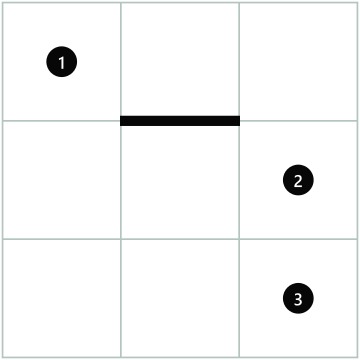
Step 1. Start at 1 in the upper-left corner. The wall blocks the downward move from the top-middle square. 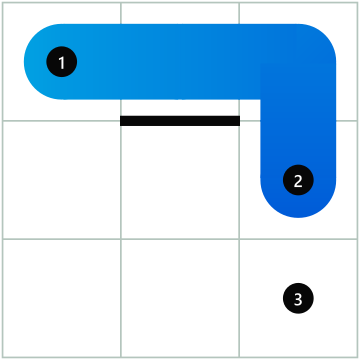
Step 2. Move right twice, then down to 2. This takes you around the wall. 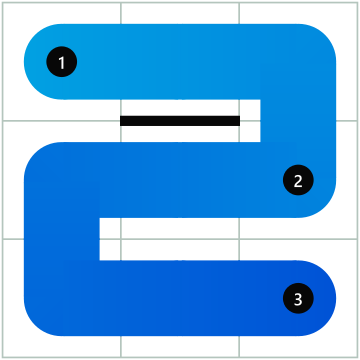
Step 3. Move left twice, down once, then right twice to 3. The path now covers all nine squares.
How to play on LinkedIn
- Find 1, the next number and any walls before you start drawing.
- Press and hold on 1, then drag through adjacent squares. Look for a route that reaches the next number while keeping the remaining squares accessible.
- If you need to change a turn, tap or drag back to an earlier square on the path. Undo reverses your last move and Reset clears your route.
- Use Hint if you get stuck. It removes the route from its first error and shows the next correct move.
Zip solving tips
Inspect corners and narrow passages
A square with only two usable edges needs both edges unless it is the start or finish. Walls can force the same pattern in the middle of a board.
Check the end of the route
Work backward from the last number to see which squares you need to save for the end.
Watch for cutoffs
Before committing to a long stretch, check whether your path would leave a pocket of unvisited squares that you cannot reach again.
Common questions
Why is my Zip puzzle unfinished after I reach the last number?
Check for uncovered squares. You may need a longer route between two consecutive clues so the final move covers the last empty square.
Can you move diagonally in Zip?
Every move crosses an open edge into the square above, below, to the left or to the right. To reach a square that only touches at a corner, take two moves through a neighboring square.
How do you erase part of a Zip path?
Click, tap or drag back to the last square you want to keep. You can redraw from there. Use Reset to clear the entire path.
Can you play LinkedIn Zip without an account?
Yes. Open the game in a browser to play as a guest. Sign in to save your progress, maintain a streak and see the leaderboards.
When does Zip reset?
LinkedIn releases a new puzzle every day at midnight Pacific Time. Find previous solutions in the Zip answer archive.